

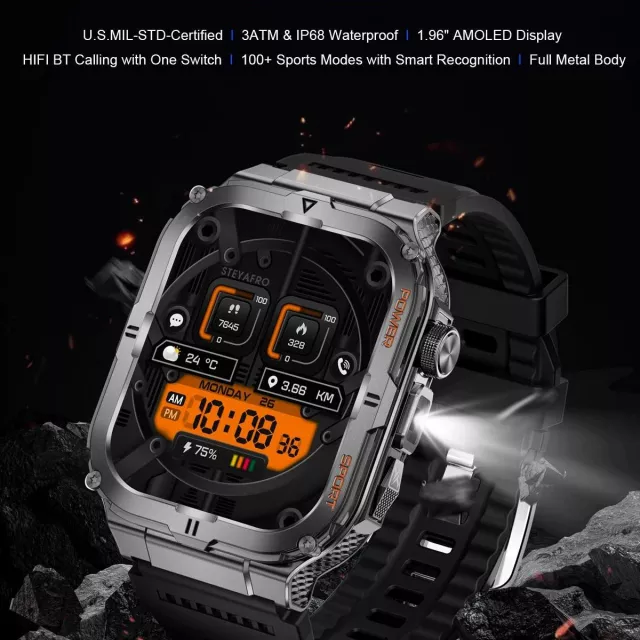
A practical everyday wearable that combines Bluetooth calling, a bright built-in LED flashlight, and a wide range of sports modes—useful for workouts, commutes, and quick light when needed. It’s designed for people who want helpful “daily life” features on the wrist without paying premium-watch pricing. For more guidance, see Life Watch Reviews: Is It the Best Budget Smartwatch?.
For current pricing and availability, see the LED Flashlight Smart Watch with Bluetooth Calling & 100+ Sports Modes. For further reading, see BANLVS SMART WATCH – Official Website.
A quick way to decide whether the flashlight-focused value model is the right fit or if a higher-end display is the priority.
| Feature | LED Flashlight Smart Watch | Rugged AMOLED Smartwatch |
|---|---|---|
| Bluetooth calling | Yes | Yes |
| Flashlight | Built-in LED light | Not highlighted as a built-in flashlight |
| Sports modes | 100+ modes | Varies by model listing |
| Display focus | Everyday smartwatch display | AMOLED with 3D curved display |
| Price | $29.95 | $96.95 |
If display quality and a more rugged look matter most, compare with the Rugged AMOLED Smartwatch with 3D Curved Display & Bluetooth Calling.
Bluetooth calling is best for short, convenient interactions—answering a call while cooking, taking a quick check-in while walking, or staying hands-free when your phone is tucked into a pocket, bag, or car mount. Because the watch connects to your phone over Bluetooth, keeping your phone nearby (and Bluetooth enabled) is what makes the calling feature feel seamless.
Bluetooth is a standardized technology, and compatibility can vary by phone settings and permissions. For deeper technical background, the Bluetooth SIG maintains specifications and guidance at bluetooth.com.
A built-in LED flashlight sounds minor until it becomes part of your routine. It’s ideal for short, close-range lighting: checking a keyhole at the front door, navigating a dark hallway without turning on overhead lights, doing a quick “bag search” for earbuds, or looking under a car seat.
For commuters, dog walkers, students heading back from late classes, and travelers in unfamiliar places, it’s a practical feature that can feel surprisingly “premium” at a value price.
With 100+ sports modes, the watch is built for variety—helpful when the week includes a mix of walking, treadmill runs, cycling, strength training, or casual recreation. Picking a specific mode helps organize workouts and makes it easier to compare sessions over time.
If you’re using heart-rate-based training, it helps to understand general target heart rate guidance. The American Heart Association offers an accessible overview at heart.org.
Comfort is the make-or-break factor for all-day wear. For workouts, you’ll want a band feel that stays stable through sweat and movement without pinching. For workdays, the goal is “set it and forget it”—a watch that quietly handles notifications, time checks, and quick call access without feeling bulky.
Consider another option if a premium AMOLED display and a more rugged, standout build are top priorities. In that case, take a look at the Rugged AMOLED Smartwatch with 3D Curved Display & Bluetooth Calling. Also consider upgrading if you require advanced sport metrics or specialized training analytics beyond general activity modes.
Bluetooth calling typically requires your phone to be nearby and connected via Bluetooth. Unless a watch specifically states it has standalone cellular service, it won’t place or receive calls independently.
It’s very useful for quick, short-range lighting—finding keys, checking a hallway, brief outdoor visibility, or small emergencies like a power outage. It’s meant for convenient illumination rather than long-distance brightness.
Many watches track best when you manually start the correct sports mode before your session. If automatic detection is available, it usually covers common activities, while more niche modes are typically started manually.










Leave a comment